---

Showing posts with label sparkfun. Show all posts

Thursday, May 31, 2012

Sparkfun Venus GPS and Arduino

I've just been playing with the Sparkfun Venus GPS module.

Very neat! It comes with more interfaces than you can shake a stick at, see the spec on the Sparkfun page. But I decided to use good old serial (or to be accurate the Software Serial library on the Arduino), so I just attached header pins to the RX0, TX0, 3.3V and GND connections and pushed it into some breadboard.

Upload the following sketch to your Arduino BEFORE making any connections. 5V from an IO pin left high on the Arduino may well kill the 3.3V output from the Tx pin on the GPS module.

#include <SoftwareSerial.h>

SoftwareSerial gpsSerial(10, 11); // RX, TX (TX not used)
const int sentenceSize = 80;

char sentence[sentenceSize];

void setup()
{
  Serial.begin(9600);
  gpsSerial.begin(9600);
}

void loop()
{
  static int i = 0;
  if (gpsSerial.available())
  {
    char ch = gpsSerial.read();
    if (ch != '\n' && i < sentenceSize)
    {
      sentence[i] = ch;
      i++;
    }
    else
    {
     sentence[i] = '\0';
     i = 0;
     displayGPS();
    }
  }
}

void displayGPS()
{
  char field[20];
  getField(field, 0);
  if (strcmp(field, "$GPRMC") == 0)
  {
    Serial.print("Lat: ");
    getField(field, 3);  // number
    Serial.print(field);
    getField(field, 4); // N/S
    Serial.print(field);
    
    Serial.print(" Long: ");
    getField(field, 5);  // number
    Serial.print(field);
    getField(field, 6);  // E/W
    Serial.println(field);
  }
}

void getField(char* buffer, int index)
{
  int sentencePos = 0;
  int fieldPos = 0;
  int commaCount = 0;
  while (sentencePos < sentenceSize)
  {
    if (sentence[sentencePos] == ',')
    {
      commaCount ++;
      sentencePos ++;
    }
    if (commaCount == index)
    {
      buffer[fieldPos] = sentence[sentencePos];
      fieldPos ++;
    }
    sentencePos ++;
  }
  buffer[fieldPos] = '\0';
} 

Make the following connections
  • The red lead goes from 3.3V Arduino to 3.3V GPS Module
  • The blue lead, GND to GND
  • The yellow lead Arduino Pin 10 to TX0 on the GPS Module


Open the Serial Monitor and view your position!


There is a really useful resource here, on the Arduino Playground, that tells you all about the various fields that your GPS unit is sending.

About the Author
These are my books. Click on the image below to find out more about them.


Friday, September 16, 2011

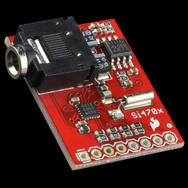
New Arduino Library for Sparkfun Si4703 FM Receiver Breakout Board

The Sparkfun Si4703 FM Receiver Breakout Board is a great little FM radio, complete with RDS and a 100mW stereo amp.


There is example code for using it and top marks to Nathan Seidle from Sparkfun for working out how to use the pesky thing from the largely opaque datasheet for the receiver chip.

I have been making myself the 'ultimate' FM receiver. Arduino-based and using nice controls, solar-charging of battery with charging data and an LCD display for the RDS data. I will post on this when its finished.

The software engineer in me railed at just hacking away at Nathan's example. So I put his code in a library and also fixed some of the problems with RDS and did a bit of tidying.

You can download it from here. Continuing Nathan's licensing arrangement, I also offer it as 'Beer-ware'. If you are feeling extremely grateful then by all means buy one of my books (see right panel).

Here is an example app, just connect up the three pins at the top of the sketch but remember Vcc for the breakout board is 3.3V NOT 5V. 5V will kill it:


#include <Si4703_Breakout.h>
#include <Wire.h>


int resetPin = 2;
int SDIO = A4;
int SCLK = A5;


Si4703_Breakout radio(resetPin, SDIO, SCLK);
int channel;
int volume;
char rdsBuffer[10];


void setup()
{
  Serial.begin(9600);
  Serial.println("\n\nSi4703_Breakout Test Sketch");
  Serial.println("===========================");  
  Serial.println("a b     Favourite stations");
  Serial.println("+ -     Volume (max 15)");
  Serial.println("u d     Seek up / down");
  Serial.println("r       Listen for RDS Data (15 sec timeout)");
  Serial.println("Send me a command letter.");


  radio.powerOn();
  radio.setVolume(0);
}


void loop()
{
  if (Serial.available())
  {
    char ch = Serial.read();
    if (ch == 'u') 
    {
      channel = radio.seekUp();
      displayInfo();
    } 
    else if (ch == 'd') 
    {
      channel = radio.seekDown();
      displayInfo();
    } 
    else if (ch == '+') 
    {
      volume ++;
      if (volume == 16) volume = 15;
      radio.setVolume(volume);
      displayInfo();
    } 
    else if (ch == '-') 
    {
      volume --;
      if (volume < 0) volume = 0;
      radio.setVolume(volume);
      displayInfo();
    } 
    else if (ch == 'a')
    {
      channel = 930; // Rock FM
      radio.setChannel(channel);
      displayInfo();
    }
    else if (ch == 'b')
    {
      channel = 974; // BBC R4
      radio.setChannel(channel);
      displayInfo();
    }
    else if (ch == 'r')
    {
      Serial.println("RDS listening");
      radio.readRDS(rdsBuffer, 15000);
      Serial.print("RDS heard:");
      Serial.println(rdsBuffer);      
    }
  }
}


void displayInfo()
{
   Serial.print("Channel:"); Serial.print(channel); 
   Serial.print(" Volume:"); Serial.println(volume); 
}


Here is the public part of the class definition.


class Si4703_Breakout
{
  public:
    Si4703_Breakout(int resetPin, int sdioPin, int sclkPin);
    void powerOn(); // call in setup
void setChannel(int channel);   // 3 digit channel number
int seekUp(); // returns the tuned channel or 0
int seekDown();
void setVolume(int volume); // 0 to 15
void readRDS(char* message, long timeout);
// message should be at least 9 chars
// result will be null terminated
// timeout in milliseconds


About the Author
These are my books. Click on the image below to find out more about them.